Every connection you have, tidied into one rather handsome window.
Nexus is a cross-platform desktop client that brings SSH, Telnet, raw TCP, and your GitHub repositories into a single calm, keyboard-driven home. It treats your servers with the respect they deserve and your eyes with the courtesy they have been quietly begging for.
Encrypted credentials, tabbed sessions with split panes, a built-in SFTP drawer, session recording, and a command palette that actually remembers where you left off.
One window. Every protocol. No drama.
Nexus tidies away the usual sprawl of half a dozen clients, a mystery spreadsheet of credentials, and three terminal windows you stopped trusting on Tuesday.
A thoughtful interface, sensible defaults, and serious credential hygiene — without a single nag, pop-up, or bit of productivity theatre.
Dark, Material-inspired, and quietly clever.
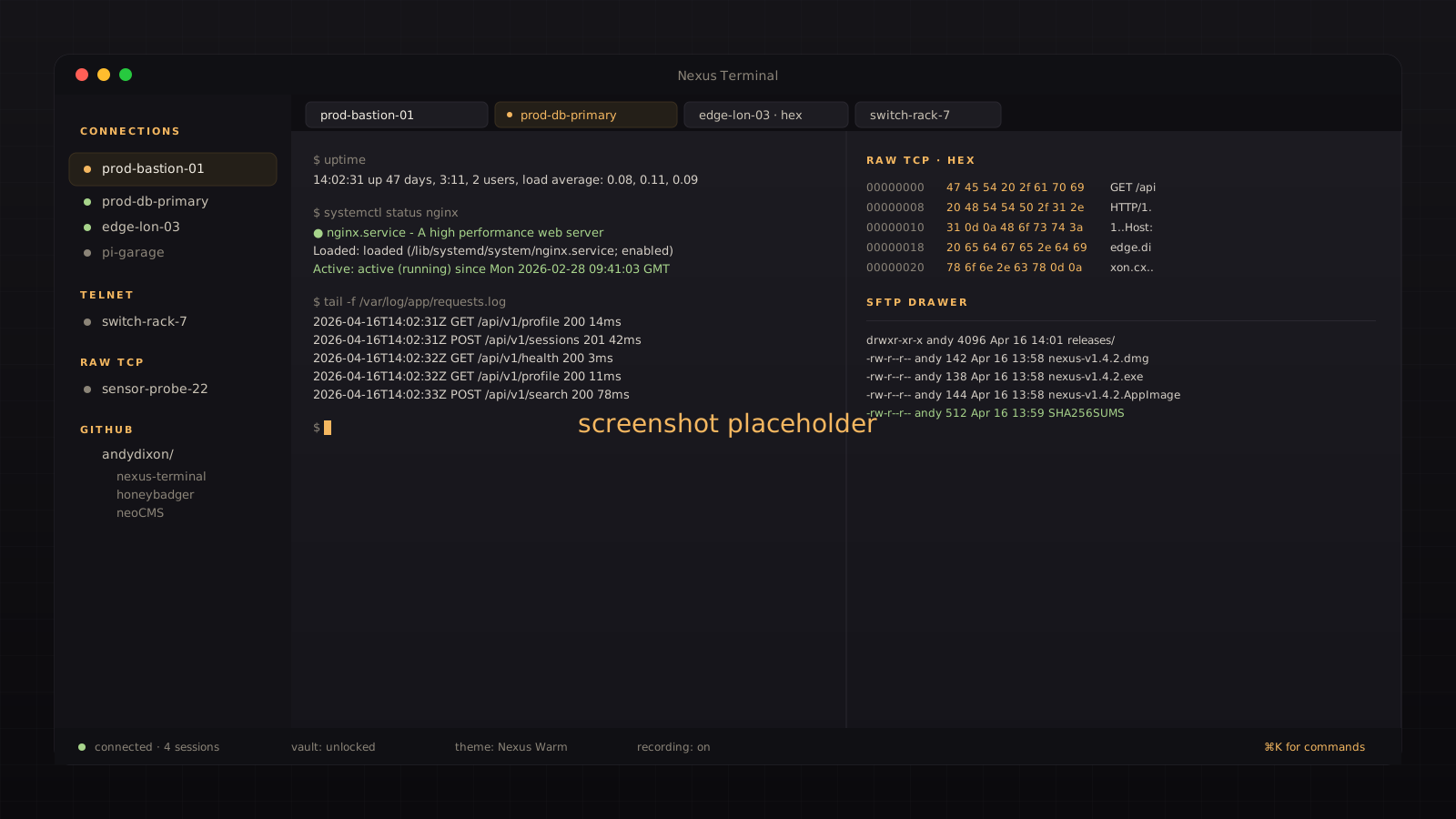
A terminal that behaves like a product, not a museum exhibit.
Most terminal clients treat the user as an inconvenience. The windows stack awkwardly, credentials live in whichever file felt convenient at 2am, and anything more ambitious than a plain SSH session requires a small personal ceremony.
Nexus was built to be the opposite: a calm, opinionated, rather good-looking workspace where every connection you own is one keystroke away. Profiles are organised, credentials are encrypted, and moving between a raw TCP probe, a bastion-hopped SSH session, and a quick Telnet check feels like one tool doing its job — not three half-tools pretending.
It is the terminal for people who like their servers reachable, their passwords un-leaked, and their interface designed with some affection.
Developers and sysadmins who live in the terminal and are tired of the usual sprawl of clients, credential files, and muscle-memory inconsistencies across machines.
Nexus is available on GitHub. Contributions, bug reports, and tales of unusually stubborn legacy kit are all welcome.
Four protocols, one graceful sidebar.
SSH, Telnet, raw TCP, and GitHub live together in the same sidebar, behaving like a single coherent tool.
SSH
Grown-up SSH, without the faffPassword, public key, keyboard-interactive, and SSH agent authentication. Jump hosts and multi-hop bastion chains for properly locked-down estates.
- Local, remote, and dynamic (SOCKS) port forwarding
- Built-in SFTP drawer for file transfers
- Reads your existing
~/.ssh/config
Telnet
Because some kit never retiredProper option negotiation for stubborn old hardware. Configurable character encoding, local echo, and line endings. A tidy experience for gear that has outlived three operating systems.
RAW TCP
Poke a port. See what it is made of.Text, hex, and split views side by side for when the wire is doing something interesting. Payload presets, auto-reconnect, and configurable encoding.
GitHub
Your repositories, one click awayBrowse repositories grouped by organisation, sorted by most recent commit — so today's work is where you expect it. Lives in the same sidebar as everything else.
The small touches that make it feel, well, nexus-y.
Tabs & Split Panes
Open sessions in tabs, pin the ones you always want, reorder by feel, and split the pane vertically or horizontally when two views are better than one.
Command Palette
Hit Cmd/Ctrl+K and every command, profile, and setting is right there. No hunting through menus. No muscle-memory tax.
SFTP Drawer
For SSH sessions, SFTP slides in as a right-side overlay. Drag, drop, shuffle files, carry on with your session. No second app required.
Session Recording
Capture a session to an asciicast v2 file and play it back later. Perfect for evidence, handovers, or reminding yourself what on earth you did on Tuesday.
Eight Themes
Eight built-in colour themes, each carefully tuned so your eyes still work at the end of the day. Dark, Material-inspired, and never shouty.
Profile Import
Import directly from ~/.ssh/config, or move between machines with encrypted .nexus profile bundles. Secrets stay secret; profiles stay portable.
Automatic Updates
Nexus checks for new releases in the background and lets you know when a fresh version is available — no background noise, no hand-holding, no surprises.
Credential hygiene, taken seriously and styled nicely.
Passwords and passphrases never hit a plain text file. Not by default, not by accident.
OS Keychain First
Your system's vault, used properlyWhere your operating system offers a keychain — Keychain on macOS, Secret Service on Linux, Credential Manager on Windows — Nexus uses it automatically.
Encrypted Vault
A proper fallback, not a shrugWhen a keychain is unavailable, Nexus uses its own encrypted vault with AES-256-GCM and a master password of your choosing. A strength meter nudges you towards something you won't regret at 3am.
Known Hosts
Four policies, one sensible default- Strict — reject anything whose fingerprint you haven't blessed
- Ask — prompt on the unknown, so you stay in control
- Accept new — trust on first use, notice when a key changes
- Insecure — available, not recommended, clearly labelled
Portable Profiles
Encrypted.nexus bundles
Export profiles as encrypted bundles to carry between machines. By default your secrets stay behind — include them deliberately, or not at all. Nothing leaves in the clear.
Ready to make your terminal the nicest window on your desk?
Nexus Terminal runs on macOS, Windows, and Linux. Grab a release, try it against your everyday servers for an afternoon, and see whether it earns its place — it usually does.
Feedback, feature requests, and tales of unusual legacy kit are all very welcome. The more peculiar the estate, the better.
The apps catalogue has the full range of tools, including the forensic workbench, firmware analyser, and interactive fiction experiments.
Analytics consultancy — metrics, observability, and deep analysis for teams that need more than a dashboard.